
Store / Help & Support / Plugin Software / Aries Equalizer
Help & Support
Aries Equalizer
Detailed tonal shaping on individual tracks
Insert Aries Equalizer directly on an individual take, such as kick, snare, tom or another source needing tonal correction. Its 12-band design supports precise shaping before the tracks enter a shared bus.
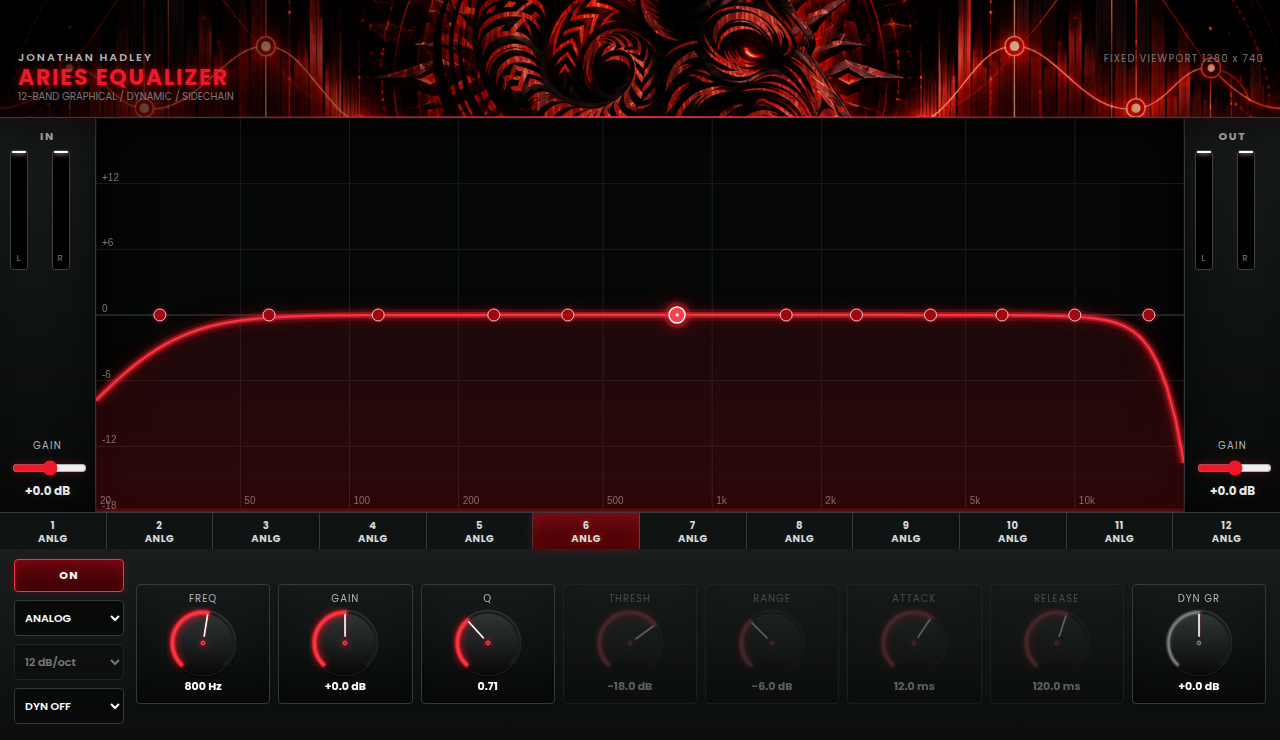
Main controls
- Input Gain: Sets the level entering the EQ.
- 12 independent bands: Enable a band and choose its filter type, frequency, gain, Q/width and available slope.
- Filter types: High-pass, low-pass, Baxandall, analog-style, band shelf and push-pull styles.
- Dynamic mode: A band can respond to the local signal rather than applying only a fixed cut or boost.
- Sidechain-dynamic mode: Uses a detector from a sidechain where available; the sidechain is a control source, not additional output audio.
- Threshold, Range, Attack and Release: Shape how dynamic bands respond.
- Output Gain: Sets the level leaving the EQ.
A first mix
Start with the whole mix playing. Enable one band at a time and correct the most obvious problem first. For resonances that only appear on certain notes or hits, consider a dynamic band instead of a permanent deep notch. Compare active and bypassed sound at similar perceived loudness.
Important note
Equalizer does not have a Learn feature in its V1 specification. It is intended as a controllable EQ, not an automatic replacement for listening.
General setup and advice
Load the plugin in a compatible VST3 DAW and confirm that its license is active. Start with a sensible input level, then adjust the controls while listening in the context of the full mix. Plugin output controls do not replace the DAW fader; use the fader for creative balance and automation. If a meter has no reading, verify that audio is reaching the plugin and that playback is active.
Aries Link: Where a guide mentions automatic communication, participating plugins must be loaded in the same compatible session and the relevant functions enabled. Aries Link is a control/analysis connection, not an extra audio cable. It does not replace normal bus routing.
Security: Downloads are unsigned. Your operating system may require manual authorization. Review security notices before proceeding.