Store / Help & Support / Plugin Software / Aries Guitar FX
Help & Support
Aries Guitar FX
Creative, reorderable guitar pedalboard
Insert Aries Guitar FX before Aries Guitar on a Lead Guitar Bus, or use it wherever an instrument needs its effects. Its processing combines fixed input/output stages with a reorderable chain of effects.
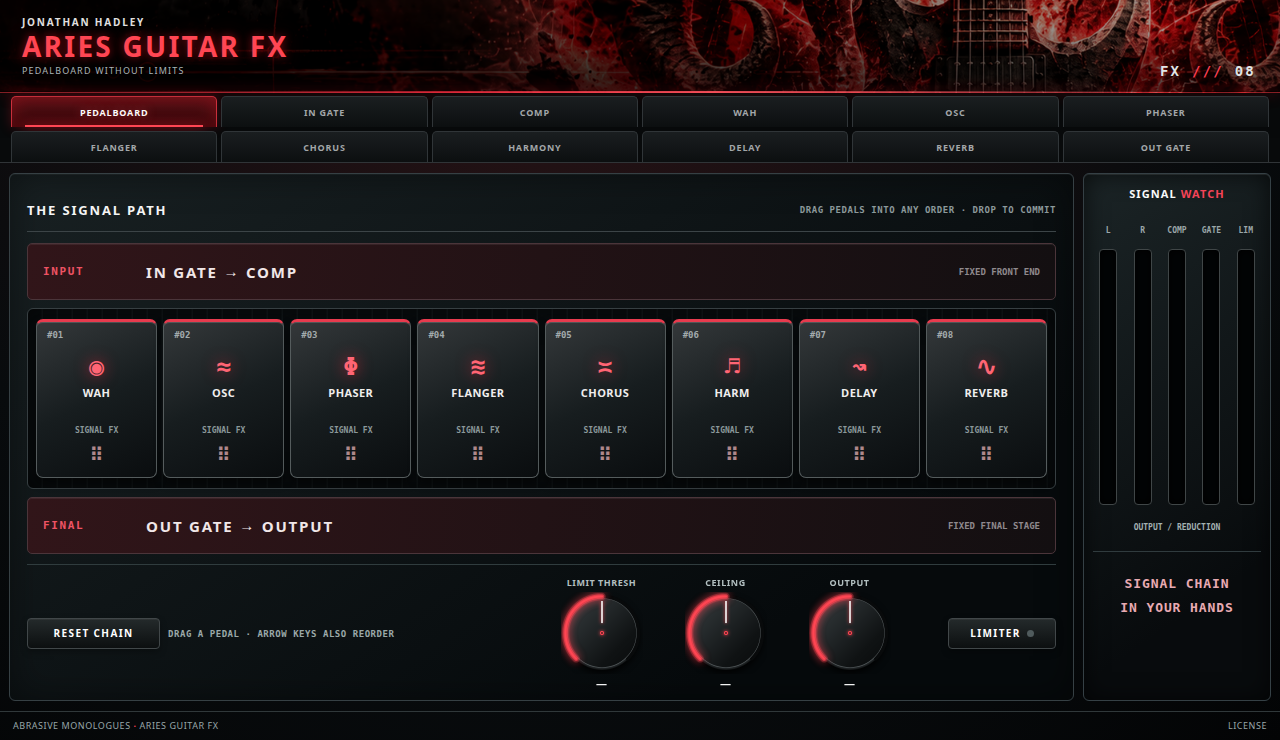
Fixed sections
- Input Gate / Noise Reduction: Cleans signal before effects; use Noise Reduction for more natural tails and Hard Gate for sharper stops.
- Compressor: Choose Peak, RMS or Hybrid detection; adjust threshold, ratio, attack, release, knee, mix and makeup as needed.
- Output Gate / Noise Reduction: Controls the outgoing signal and effect decay; Tight favors faster high-gain stops.
- Output Gain / Limiter: Set a suitable output level after the effects.
Effect modules
- Auto Wah: Envelope, tempo or MIDI-velocity driven filtering.
- Oscillator: Tremolo, ring modulation and drone-like textures.
- Phaser: Sweeping phase movement.
- Flanger: Classic, through-zero and jet-style sweep.
- Chorus: Classic, wide and ensemble-style modulation.
- Harmony: Pitch and harmony effect controls where available.
- Delay: Timed or synced repeats, including ping-pong, octave and glitch variations.
- Reverb: Room, hall, plate and spring spaces.
Routing and first use
Begin with effects off. Enable one effect, adjust Mix (dry/wet), then set its Level. Reorder the middle effects in the routing view to change what processes what. Input gate and compressor remain before that section; output gate and gain/limiting remain afterward. For complex chains, build gradually and compare against the dry guitar at a matched level.
Troubleshooting
- No effect heard: Confirm the module is enabled and Mix is above zero.
- Repeats or reverb are cut off: Check output gate behavior.
- Unexpected sound after reordering: Review the chain order; moving time-based effects changes their inputs and tails.
General setup and advice
Load the plugin in a compatible VST3 DAW and confirm that its license is active. Start with a sensible input level, then adjust the controls while listening in the context of the full mix. Plugin output controls do not replace the DAW fader; use the fader for creative balance and automation. If a meter has no reading, verify that audio is reaching the plugin and that playback is active.
Aries Link: Where a guide mentions automatic communication, participating plugins must be loaded in the same compatible session and the relevant functions enabled. Aries Link is a control/analysis connection, not an extra audio cable. It does not replace normal bus routing.
Security: Downloads are unsigned. Your operating system may require manual authorization. Review security notices before proceeding.