
Store / Help & Support / Plugin Software / Aries Sub Drop
Help & Support
Aries Sub Drop
MIDI-triggered deep sub-bass bloom
Use Aries Sub Drop on a MIDI/instrument track in a DAW that can route notes to the plugin. Sub Drop generates a low-frequency tonal bloom; it is not intended to add a sharp click or an upper-bass impact pulse. Route its audio to a suitable instrument group or the Instrument Bus and monitor the sub energy on full-range speakers or headphones.
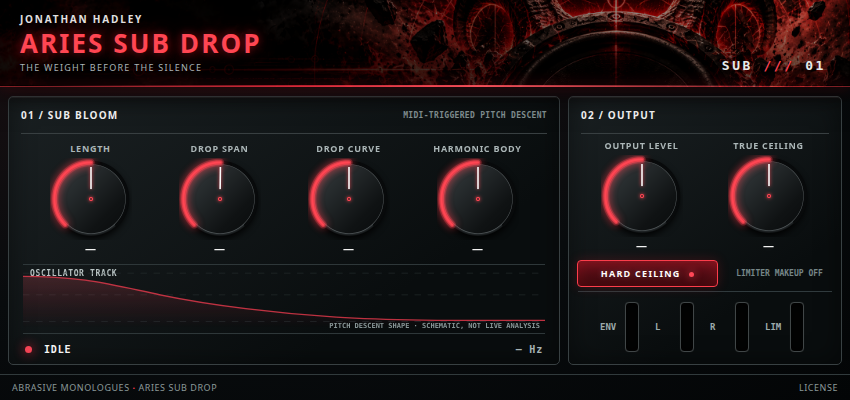
A first use
- Insert Sub Drop on a MIDI-capable track and send it a note.
- Set Length for the total rise and decay of the note.
- Adjust Span and Curve to shape the downward pitch movement.
- Add Body only if you want subtle harmonics accompanying the deep fundamental.
- Check the output ceiling and the total low-frequency level against your kick and bass.
The sound begins with a short clean fade-in, falls toward the target pitch and leaves a long decay. A MIDI Note-Off chokes the event.
Troubleshooting
- Silence: Confirm the DAW actually sends MIDI Note-On to the plugin and that the note is within the supported range.
- Seems quieter than expected: Deep sub energy may be inaudible on small speakers; check a spectrum analyzer and appropriate monitoring.
- Low end overwhelms the mix: Shorten Length, reduce the level or choose less overlapping notes.
General setup and advice
Load the plugin in a compatible VST3 DAW and confirm that its license is active. Start with a sensible input level, then adjust the controls while listening in the context of the full mix. Plugin output controls do not replace the DAW fader; use the fader for creative balance and automation. If a meter has no reading, verify that audio is reaching the plugin and that playback is active.
Aries Link: Where a guide mentions automatic communication, participating plugins must be loaded in the same compatible session and the relevant functions enabled. Aries Link is a control/analysis connection, not an extra audio cable. It does not replace normal bus routing.
Security: Downloads are unsigned. Your operating system may require manual authorization. Review security notices before proceeding.