Store / Help & Support / Plugin Software / Aries Unmask
Help & Support
Aries Unmask
Make space for vocals in the instrumental mix
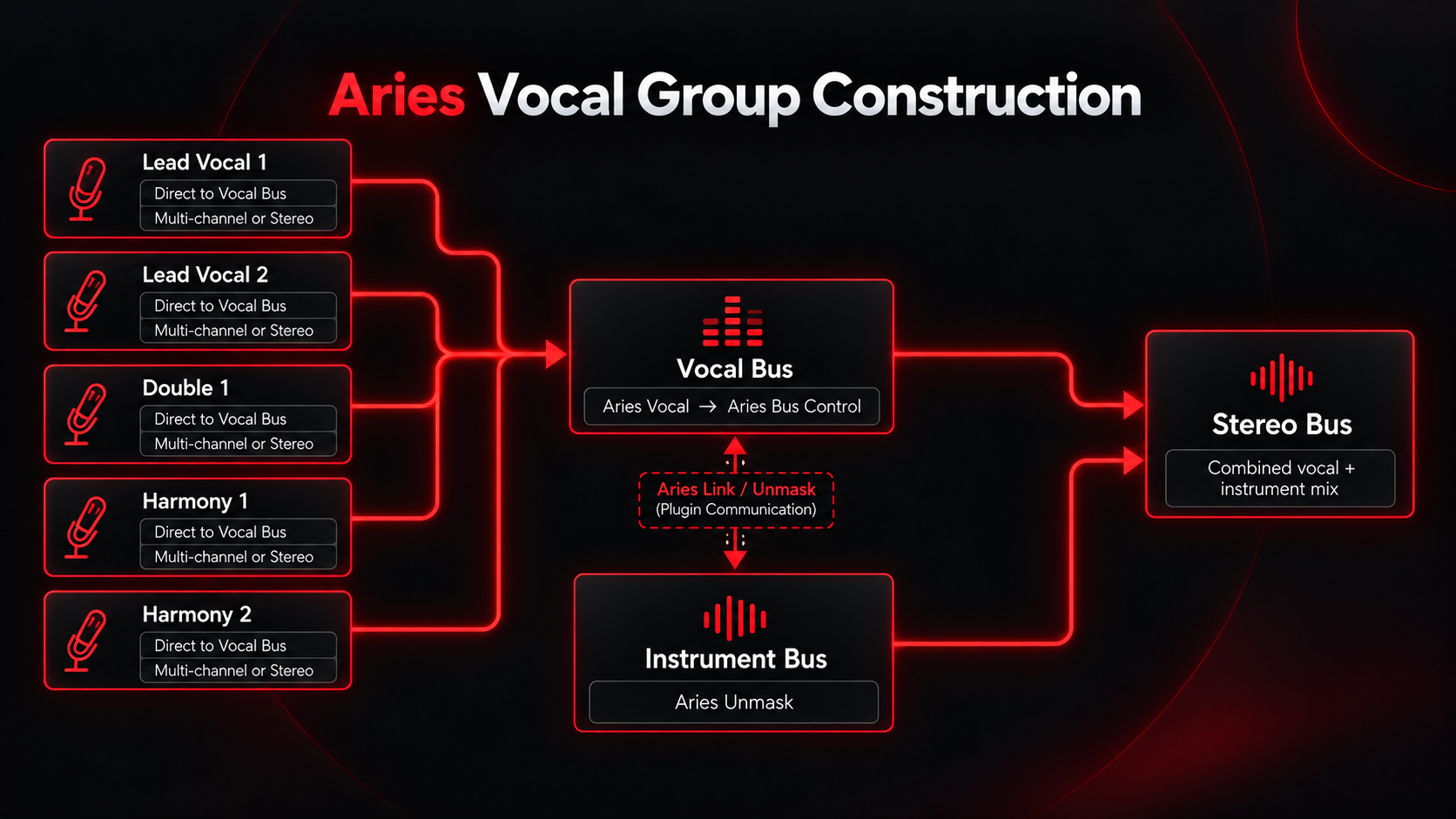
Insert Aries Unmask on the Instrument Bus. Route all instrument-group buses into that bus. Route the Instrument Bus to the Stereo Bus, where it combines with the separate Vocal Bus. Aries Vocal belongs on the Vocal Bus; Unmask stays with the instruments.
How it works for a mixer
Aries Vocal shares vocal activity information with Aries Unmask through Aries Link. Unmask uses that information to reduce competing instrument frequencies when the vocal is present, allowing intelligibility without a permanent broad cut to the entire instrumental track. This is inter-plugin communication, not an extra audio connection.
A first mix
- Confirm that both Vocal and Unmask are active in the same session.
- Check that the vocal and instruments are audible through their respective buses.
- Enable unmasking and play a dense section containing both voice and instruments.
- Adjust Amount, Speed and Focus (where exposed in your installed version) for a natural reduction that follows the vocal.
- Compare with unmasking disabled at similar levels. The goal is intelligibility, not obvious pumping.
Troubleshooting
- No audible effect: Confirm Vocal is publishing usable activity and Unmask is receiving instrument audio.
- Instruments sound thin: Reduce Amount or revisit Focus.
- Effect feels sluggish or unnatural: Adjust Speed and compare during both short syllables and held notes.
General setup and advice
Load the plugin in a compatible VST3 DAW and confirm that its license is active. Start with a sensible input level, then adjust the controls while listening in the context of the full mix. Plugin output controls do not replace the DAW fader; use the fader for creative balance and automation. If a meter has no reading, verify that audio is reaching the plugin and that playback is active.
Aries Link: Where a guide mentions automatic communication, participating plugins must be loaded in the same compatible session and the relevant functions enabled. Aries Link is a control/analysis connection, not an extra audio cable. It does not replace normal bus routing.
Security: Downloads are unsigned. Your operating system may require manual authorization. Review security notices before proceeding.